My brain is small, so I got an assistant
Listen to this post
AI voice (Gemini TTS)
I have an AI assistant. I call it 小秘书 (xiaomishu, “little secretary”). It lives in the Claude app. Every morning it walks me through my day, every evening it tells me what tomorrow looks like, and in between it nags me about the recurring stuff I always forget.
Before the how, a bit of why.
Why it exists
Two reasons, both a little embarrassing.
My brain is small. It can’t hold everything. Errands, side projects, the haircut I keep putting off. Something always slips my mind, and it’s usually the one that mattered.
And I want to be a capable adult. Someone who can run a whole set of things in her own life and keep them running.
The hub has a projects tab, and every project has a progress bar. This sounds silly, but looking at those bars calms me down. I know I’m on top of things. I can see myself moving stuff forward, one step at a time, and that makes me get a lot more done.
It also lets me sleep. If I wanted to do something, I had to finish it before bed or it would keep bugging me. Now I know it’s written down and will land on some day, so I can let it go for tonight. (Psychologists have a name for the bugging, the Zeigarnik effect, and Masicampo & Baumeister found in 2011 that just making a concrete plan quiets it down.)
Most of the design comes from that. Each fact lives in one place, because I can’t keep track of which agent is planning my trip (yes, I have a pile of agents open at once, each one halfway through something and waiting for me to come back and push it along, more than I can count). The morning and evening messages mean I don’t have to remember to remember. The progress bars are there because “I’ll get this done someday” feels a lot calmer when I can see it.
Why the old tools didn’t stick
Things I tried:
- Reminders: they just go off at a set time, with no idea what I’m doing. I swipe them away, or just ignore them.
- Calendar: only fits things with a fixed time. Flexible stuff has nowhere to go, and a full calendar is stressful to even look at.
- Bullet journal: all by hand. I had to migrate and copy things over every day, so the moment I got lazy it broke, and I couldn’t check it on the go.
- GTD apps: Things, for example, is a really beautiful, elegant app. But once everything is laid out nicely, changing anything hurts. And I always reshuffle everything at the last minute. In Japan I did it every single day.
All of these, plus the usual to-do apps, share one big problem: I have to write everything myself. Name the project, set a priority, pick a deadline, break it into steps, fill in every little detail.
Same with email. Appointment confirmations, delivery notices, bills: I used to read each one and copy it into a to-do by hand.
Picking things back up, and booking ahead
And with a small brain, my internal context management is pretty bad too. To pick up a half-done task, I first have to find the note I left myself. When I write it I always think “I’ll obviously remember all this”, and then next time I read my own note with zero idea what it means. Then I have to set up my workbench: the tabs and files I need are scattered everywhere, and I have to dig each one up and open it. Honestly, I’m lazy, and that’s often where I get stuck.
Also, so much in the Bay Area has to be booked ahead. By the time I notice split ends and think it’s time for a haircut, my favorite slots are booked out to the week after next, so I’m stuck walking around with frizzy split ends for two more weeks. Very unhappy.
Wanting a decision system
There’s an older wish under all this. Since college I’ve wanted a “decision system”: something that learns how I decide things and then decides for me. I tried a lot of rule-based setups and every note system I could find. None of them stuck. You had to write the rules up front. And when plans changed at the last minute, two things made it painful. One, rethinking everything against the new rules. Two, the dependencies between things. Some have deadlines, and if one step slips, the whole plan falls apart. Every time I moved one thing, I had to think through everything again, and my head would just explode.
What’s different now
With an LLM, the rules showed up one correction at a time, in my preferences and in the hub’s conventions doc:
- Waking up. I love staying in bed. So I told it: when you wake me up and I resist, push back. Firmly. Don’t let me off.
- My Shibuya 3D theory. Google Maps walking times are fiction for me. Shibuya is a 3D city: you find the station entrance, get lost inside the station, go up stairs, go down stairs, read signs. A map “10 min” is 16–17 for me, and getting to the building is not getting to the shop. Now it pads every walk.
- Food. On my Japan trip I taught it a pile of personal rules. No natto. Yes to good shrimp and uni. If the line is longer than about 20 minutes, skip it. Tabelog 3.5+ beats Google ratings. Nowhere smoky. Now its restaurant picks just fit, and I don’t explain anything twice.
No rule-based system or notes app would have known to ask me any of that.
No more filling things in
Now all that filling-in can be automated. My assistant is smart enough to sort it out from context. When plans change, I just say “not feeling it today, move things around” and it reshuffles the rest for me. It keeps track of which things have deadlines and which steps wait on others, so when one thing moves, everything downstream gets sorted out too. Pair it with voice input (an AI keyboard like Typeless) and I just say a sentence and it lands in the hub. It’s so smooth.
For recurring things that need booking, like haircuts, it remembers when I last went and how far ahead I usually need to book, and when it’s getting close it reminds me “time to book”. By the time I notice split ends myself, it’s already booked.
On the email side, my assistant now goes through my inbox every morning, puts anything with a date straight into the hub, and gives me a short summary. That alone saves me so much.
No more setting up the workbench
I don’t have to manage context myself anymore either. With browser control, setting up the workbench is painless. I say I want to pick up that half-finished shopping research, and it opens the three products in separate tabs so I can compare them right away. For messy, document-heavy stuff like banking or medical things, it brings everything up at once and helps me pick my memory back up.
Any agent can do each of these on its own. For me, the big difference is that my assistant takes a lot of the context-management load off my brain. I don’t have to go back to a specific session and dig up a specific conversation. I open a fresh chat, ask my assistant, and it always knows what I’m thinking about, what I’m working on, and where I’m stuck.
A decision system that finally runs
Now it makes a lot of small calls by itself, and most of them are the ones I’d have made. It’s the first decision system that has actually worked for me. Probably my favorite applied-AI use case.
What 小秘书 actually is
It’s three things, and I didn’t really write code for any of them:
- Memory. Who I am, what I like, what I can’t stand. This lives in Claude’s memory.
- A to-do hub. A web page I published as a Claude Artifact, with its own little database. Tabs for this week, projects, areas, inbox, routines (haircuts, checkups, stuff that repeats), shopping, for-fun, and someday.
- A daily rhythm. Scheduled messages: a morning walkthrough and an evening “here’s tomorrow”.
One rule holds it together: every fact lives in exactly one place. Who I am goes in memory. What to do and when goes in the hub. If the same thing lives in two places, one copy will go stale, and the assistant will happily read you the stale one.
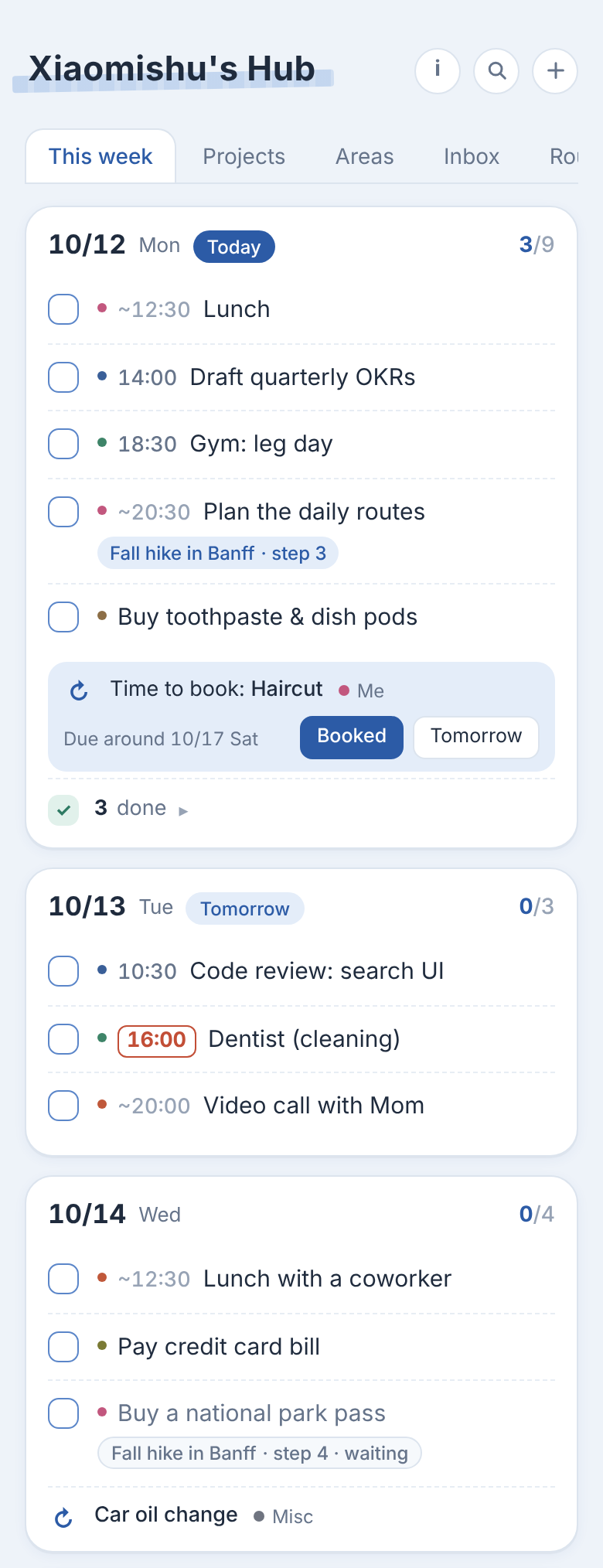 The hub’s “this week” tab. A time in a red box is a fixed appointment, ~ means “roughly then”, no time means “whenever that day”.
The technical part I keep thinking about happened one evening, before dinner.
The thing that happened before dinner
That evening, before dinner, I was in a completely different chat, a separate session with no connection to my assistant, working through a long-running, annoying personal errand. The kind with a dozen follow-ups spread over weeks, each one stuck behind the last. At the end I asked that agent to put the follow-ups into my hub.
It had never seen my hub. It didn’t know my tags, my time formats, or my scheduling quirks.
It didn’t need to. My hub’s database has a document called meta/conventions. It’s plain text, and it says things like:
- items have a
kind: task, buy, idea, fun, life fixed: truemeans a locked appointment you can’t move;approx: truemeans “around this time”- a project’s steps are items with
projectandstepfields, and a step shows “waiting for the previous step” until the one before it is done - weekday daytime is work; personal stuff goes after work
- if something’s missing, ask. Don’t guess.
The agent read it and wrote a nine-step project straight into my hub. Right fields, right order, each step waiting on the one before.
Then my actual assistant, the one that does my evening preview, saw a new project with nine undated steps and put them on the calendar.
Two agents that never talked to each other worked on my life together, through a written contract in a shared database.
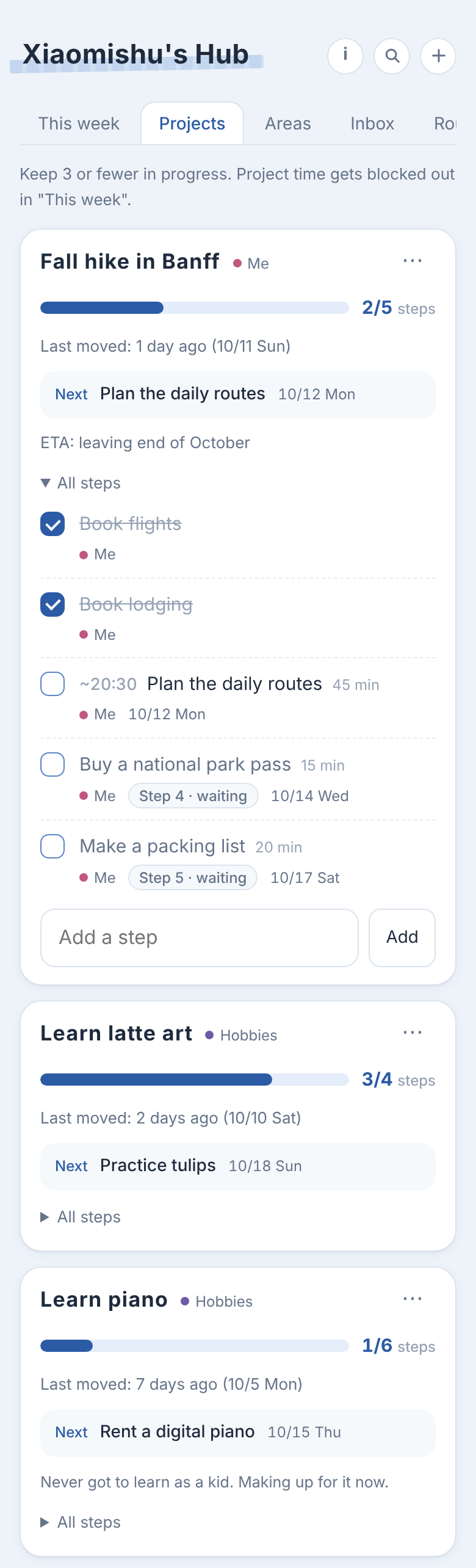 A project in the hub, with its progress bar. Each step waits on the one before it. Watching this bar fill up is most of why I use the thing.
The to-do list is the API
I’ve been thinking a lot about what “agent-native apps” look like. Most apps assume a human is clicking. You can bolt an agent on with an API, but API docs tell you how to call the thing. They don’t tell you how this one person wants her life organized.
My hub goes the other way. The page is for me: tabs, checkboxes, nice colors. The database is for agents. The conventions doc is basically the API docs, written in plain language, sitting inside the data it describes, and I can edit it whenever my preferences change. No retraining, no re-prompting. I change one doc, and every agent that reads it before writing follows the new rules.
So it’s a message bus with a README. Shared blackboards and schemas are old ideas. What’s new is that the readers can take a sentence like “no errands on weekday daytime, she’s at work” and just follow it.
Nobody owns it
The part I think is most powerful: the database doesn’t belong to any agent. All my thoughts end up in one place that no single agent owns, so handing things off is easy:
- A rough idea sits in the hub.
- I take it to whichever agent fits the job (a fresh chat, a coding agent, a research agent). It breaks the idea down and writes the steps back.
- My assistant schedules them.
The idea moves around and the agents never need to know about each other. Several can edit at once, too. Every write is versioned, so nobody silently overwrites anyone.
Up next
That’s my own assistant: a memory, a hub, and a contract any agent can read. It freed up a lot of room in my small brain, and I finally feel a bit more like a capable adult. That evening Da saw it and wanted one too, which meant figuring out what can be packaged and what can’t. That’s the next post.
I wrote this together with my assistant.